D200 System Landscape
| Document status | 35 - Reviewed |
|---|
A System Landscape must describe the overall technical context in which a solution will be part of. In order to align expectations with the customer on what is affected by the solution, and what is not affected, the System Landscape must describe both elements with which the solution must integrate, and elements with which it must not integrate.
System overview
The following overview provides insights to the systems involved in the solution.
The system is built around Container Apps. The backend services, documentation app and the frontend client.
It's only the frontend and documentation container apps that are going to be exposed to the internet. The frontend container has it's own backend that can communicate with the other backend services. The backend services is therefore never accessed over the internet and can only be accessed by each other. All the containers are behind a virtuel network subnet.
Th virtual machines running the databases are placed in their own subnet. That subnet can only be reached by the Container App Subnet or by a Bastion.
Azure Components used
- Resource Group
- App Configuration
- Key Vault
- Container Registry
- Container Apps Environment
- Container Apps
- Service Bus
- Virtual Machine
- Storage Accounts
- Application Insights
- Log Analytics
- Front Door
- Virtual Network
- Subnet
- Network Security Group
- NAT Gateway
- Entra ID
- Bastion
Other coponents used
- PostgreSQL
- TimeScale
Naming Scheme
The following naming rules is to be followed when creating resources in Azure. If a resource type can't follow the following rules because of other restrictions, be sure to write a new entry in the list with the new format. For consistency, all names must be all lowercase.
Most Azure components needs to follow this schemas:
- Resources types that only occur once per environment e.g. Application Insigts and Key Vault
- ec-[environment]-[customer]-[resource abbreviation]
- ec-dev-fm-rg
- Resources types that have multiple instances per enviroment e.g. Virtual Machines or Container Apps
- ec-[environment]-[customer]-[short description]-[resource abbreviation]
- ec-dev-fm-timeseriesservice-ca
- Azure Storage Accounts have their own rules in Azure. Only numbers and lowercase. 3 to 24 characters.
- ec[environment][customer][short description][resource abbreviation]
- ecdevfmdmccast
- Azure Container Registry names has to be 5-50 alphanumeric characters.
- ec[environment][customer][resource abbreviation]
- ecdevfmcr
With multiple environments the only naming difference is the environment variable
Naming Scheme variables
- [environment]: Must use one of the following: test, qa, staging, preprod, prod
- [customer]: The customer this instance is deployed for in short form e.g. ne for NordEnergi, dinel for Dinel or fm for Fellowmind.
- [short description]: A short description that hints to the purpose of what the resource is used for.
- [resource abbreviation]: Abbreviation of the resource type. The Microsoft recommendations should be used for Azure.
Azure Resource Groups & Purpose
The Azure resources are grouped into specific Resource Groups based on their purpose, so that it is easier to manage and maintain them.
| Resource Group Name | Purpose |
|---|---|
| ec-[environment]-[customer]-apps-rg | Container Apps |
| ec-[environment]-[customer]-container-rg | Container App Environment Infrastructure group |
| ec-[environment]-[customer]-databases-rg | Database Virtual Machine(s) and disks |
| ec-[environment]-[customer]-networking-rg | Network related resources (VNets, Subnets, NSGs) |
| ec-[environment]-[customer]-shared-rg | All other support related resources that the apps and databases share and depend on |
Technical solution perspective
The following diagram provides an overview of the technical solution setup.
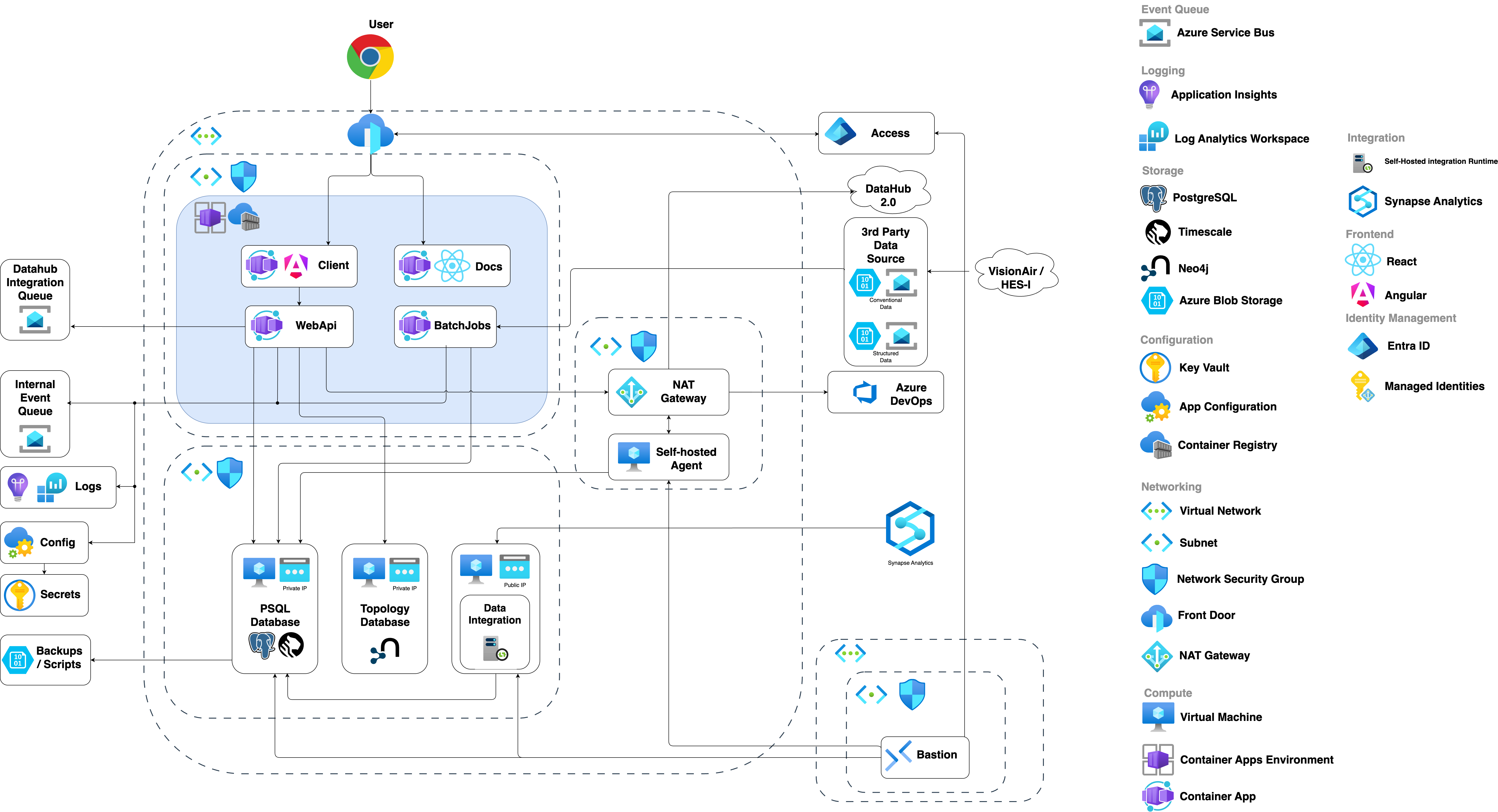
Each Azure subscription is its own environment, where a full deployment of the resources shown above will be provisioned.
There are some resources that are shared across environments:
- Bastion
- Container Registry
- Frontdoor
The shared resources are deployed to a 'shared-connectivity-subscription' and gained access to.